ritilan.com


Google keeps feeding my addiction.
They have just released their local
desktop search tool. The world is
getting much closer to perfect. All I
need now is GoogleIM and GBrowser
and all will be good.
UPDATE: wow as it indexes my hard drive
all I can say is wow. I can now search for
email with out haveing to open the client.
All the little things I dump in todo.txt and
betterway.txt pop right up. damn, just damn.
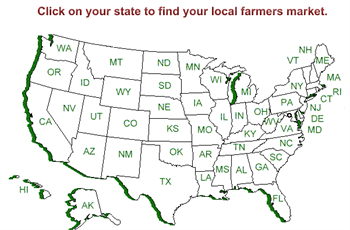
A useful site listing a good many local farmer's markets around
the US.
link (via a whole lotta nothing)

Mighty Goods is a shopping weblog. We look for things
we really like, and then we put them here, right where
you can find them.

If you are like me you have long ago moved to the happy
world of Firefox browsing. One thing that makes Firefox
such a strong browser is the ability to add extensions to it
and enhance your surfing experience. Sage is a feed
reader that allows you to surf and keep track of all of your
favorite RSS feeds from your web browser. I have been
using it now for a week or so and it has made Firefox and
even better browser.

Google keeps finding new and better ways for me to find
things. Google SMS will now let me send google a query
via SMS on my cell phone and It will send me the answer
to my question back to my cell phone in a SMS message.
All you need to do is send your Search to 46645 (GOOGL
on most phones). I sent pizza 30004 and got back 8 pizza
restaurants in my zip code (30004). It works with Froogle
for product pricing. It also allows you to use the Google
Calculator feature and find phone numbers. You can get
a list of all the features here.

The Wife and I returned from a superb trip to
London, Paris, and Rome. We booked this trip
through a travel company Go Ahead Vacations.
Never having used them before we were a bit
skeptical about what we were getting in to, by
taking a guided tour. I must say that they did a
great job we chose the company because it
seamed that the tours they offered were not very
structured and left the traveler to discover each
city as they saw fit, and not from inside a bus.
This was the case. Everything was as expected
or better with the exception of our guide Joel.
Joel was so much more than any brochure could
have explained, always cheerful helpful and ready
with a recommendation. He made the trip and
amazing experience every step of they way. I
don't think I can do him justice. If you are looking
for a tour company that keeps you in control choose
Go Ahead Vacations and if you are traveling in
Europe ask for Joel he will make the experience
one that will live in you memory for years to come.
Joel if you ever read this Thanks for a great trip!
-ritilan
If you have questions about Go Ahead Vacations
send me an email and I will get back with you.
[email protected]
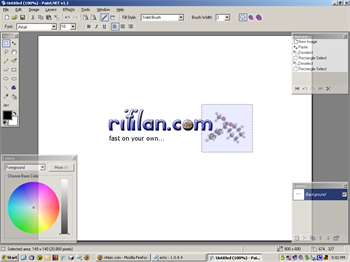
Paint.NET is a sweet replacement for Microsoft Paint. It offers
a slew features that are not available in Paint and it is Open
Source and free. It is a 4 MB download if you already have
.NET installed otherwise it is 25 or so Meg. I have only been
using it for a day or two so it may have bugs that I have not
seen but so far it has been top notch. There is also a tutorial
site to learn how to use layers and effects and blending modes.
All of which are features that MS Paint is missing.
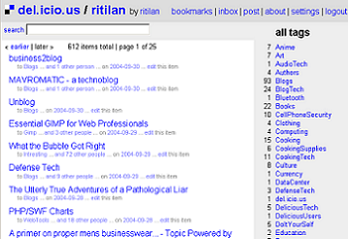
I can't say how many of my readers have ever
used del.icio.us but it is something that everyone
needs. It is very like Tivo in that you can't
explain to someone who is not using it why they
must but once they get it and use it they can
never go back to the world as it was before. I
have been using del.icio.us for about nine months
and I can say without any reservations it is the
best way to keep up with your web travels. It has
replaced my use of favorites/bookmarks and has
changed how I wander through the web. Go and
take a look at it.
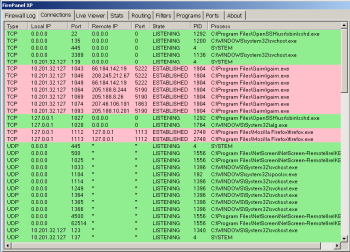
"It improves your Windows Firewall, with features not
normally available to users. Set rules, monitor your
firewall activity, filter packets, watch logs, and keep
realtime tabs on what exactly your connection is
being exposed to."
link (via shell city)
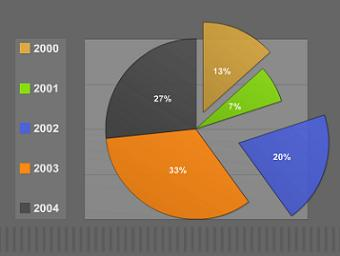
This php script allows you to create great looking graphs
in Shockwave on the fly. It looks fairly intuitive.
link (via whole lotta nothing)
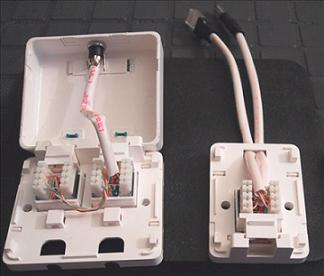
An informative little how to page for building
your own power over ethernet injectors.
Here is a handy refrence site that list networked
devices and the default usernames and passwords
that they are shiped with.

Basic soldering is a skill that's easy to learn and
not too hard to master. It just takes practice.
There is a huge range of soldered joints out there,
from tiny chip resistors on circuit boards to large
UHF connectors. There is also a large variety of
irons, tips and solder to choose from, and it
certainly does help to have the right tool for the
job.
Although we will focus on the middle range of
connector and cable size in this tutorial (using
audio cable and connectors as examples), the theory
can be applied to a solder joint of any size.
You can either work your way through the steps in
this soldering tutorial, or go directly to any step
from this page.

Make will have 5-minute tips you can use to improve
your gadgets, networks, and computers, as well as much
longer projects that might take several days (or weeks)
to complete. The first issue is coming out in January.
If you're interested, visit the web site and sign up for
the newsletter.
I can't wait for this to come out. If it is like all the
other Oreilly books it should be an amazing resource.
link (via boingboing)
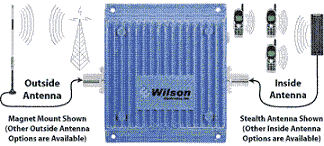
How many of you have spots in your home
that you loose cell signal or a spot on
the drive home that no matter how fast
you drive you still drop the call? Well
here is the fix.
1. Don’t know what you don’t know.
It is essential not to profess to know, or seem to know,
or accept that someone else knows, that which is unknown.
Almost without exception, the things that end up coming
back to haunt you are things you pretended to understand
but didn’t early on. At virtually every stage of even the
most successful software projects, there are large numbers
of very important things that are unknown. It is acceptable,
even mandatory, to clearly articulate your ignorance, so
that no one misunderstands the corporate state of
unknowingness. If you do not disseminate this "lucid
ignorance," disaster will surely befall you.
Human nature is such that we dislike not knowing things
that are important to our well being. Since there is so
much we don’t know in a software project, the nearly
universal tendency among developers and their managers is
to gloss over or even deny altogether the extent of their
ignorance. You should reward and treasure those who
consistently make themselves aware of the list of relevant
things that are currently unknown. It requires mental and
psychological strength to resist the normal human cravings
for certainty and order. It especially difficult to believe
in uncertainty when things have a veneer of orderliness,
which is often the case. Pseudo-order is a maladapted defense
against uncertainty.
The organization surrounding you will undoubtedly abhor
uncertainty, would infinitely prefer pseudo-order and will
make countless attempts to magically convert your ignorance
to knowledge. Your job is to make uncertainty an unshakable
fact, and to coerce the reshaping of the surrounding
organization to cope with the uncertain situation. The
organization must learn to thrive in an uncertain environment
for its own well being.
You should expend a great deal of effort making sure that all
the people on the project are aware of their ignorance rather
than naively converting it to falsehoods. Bear down on them
until they realize they haven’t comprehensively assessed the
unknowns. In the successful project, this is much easier in
the early stages, or during times of change. This is no time
for niceties. People ultimately prefer success even if
disillusionment is a prerequisite.
This list can be applied to almost any situation.
Rule #1 above is so true it hurts. Just to think
about how many times this has gotten me into trouble.
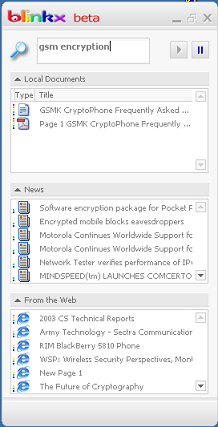
Blinkx allows me to search all my local
documents and email as well as the web
all from one local app. Nice but still
beta.
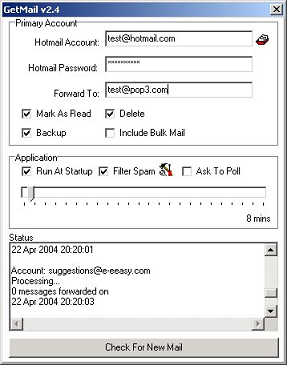
I have just started to use GetMail and
it works like a charm. I set it up on
a seldom used machine and it forwards
all of my hotmail into my gmail account.
link (via as I live the questions)

Bookbinding, the art of sewing pages into a cover to
make a book, can serve many purposes. This tutorial
introduction is aimed primarily at those who wish to
preserve the content of old pulp paperbacks by
photocopying them onto archival paper and then binding
the results using an archival binding technique, the
long-stitch. Most of this tutirial is equally applicable
to binding materials from other sources.
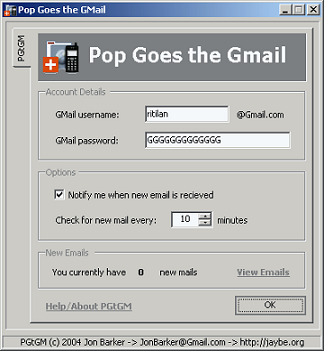
This is a super useful little application. It allows
you to check your Gmail account with your
regular mail client. I have it up and running
with Thunderbird and it works great.
I am not sure of the reason behind
this list but there are to many good
links in it to pass it up.

The LOST ( Linux-One-Stanza Tips )
is a series of small GNU/Linux
related hints and tips. Like this
handy one.
Sub : LILO error messages LOST #406
L : First module loaded, but cannot load second stage.
LI : Loading correct. Failed to execute.
LIL : Loading and execution ok. Descriptor table not loaded.
LIL? : Second module loaded at incorrect address.
LIL- : The descriptor table is corrupt.

Not to leave out the Windows world
here are 99 tips to make XP work
better, faster, stronger.
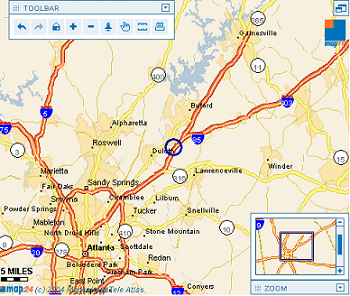
Map24 may be the best map site I have ever
used. The interface is clean and fast and
gives you just the info you want. So much
better than mapquest.

As all of my regular readers know
I can't spell, or punctuate, use
grammar, or express an idea using
words that were not in a third grade
vocab book. But I can find others
that do so. Here is Mark from A
Random Walk Down Tech Street
with his rundown on gmail.

This site has a new Japanese
word each day along with its
translation.
This site has a nice list of file extensions and the
applications needed to open then on your
Windows or Mac system. Not all encompassing
but a good list none the less.

Charles and Jason have been preaching the virtues
of VMware to me for the last year or so and I in my
own typical fanion have heard not a word that they
have said. But this weekend while studying for some
Linux tests I have found that they were right and I
was well behind the times. I could have build up four
\boxes and loaded redhat on each but the amount of
time and space and reconfig on my current lab and
work environment at home would have been enormous.
But with VMware I added four new virtual machines
and told it to use the .iso image for the boot cd-rom
and (Bam) I have a networked test environment in
under 20 min. I am now a convert. Jason, Charles
your kung-fu is the best. (One side note VMware likes
the RAM. In order to make the setup usable and fast I
had to bump my memory up to 2Gig from 512meg but I
had been wanting to do that any way)

I logged in to Gmail for the first time tonight and I must say I am
impressed. It is a very fast interface and it works quite well.
It makes my hotmail account appear to be very slow. It is also
not cluttered with all the ads around the edge of the window that
flash and blink. I will write more late after I have had a chance
to use it more.
Here is a site that lists all the Blog Search tools out there.
Link (via tinyapps.org)

This site is therefore meant for all those who are not yet
familiar with all the functions and required syntaxes(of
Google). This way Soople enables an 'easy expert search'!