ritilan.com


UnixKit for Windows is a toolkit of Unixlike
programs for Microsoft Windows. Unlike CygWin,
it does not require installation. In fact, it
leaves absolutely no traces on the host machine
when you're done using it.
Unlike Windows Services for Unix, it isn't made
by Microsoft. 'Nuff said.
The -tiny branch presently includes:
arc arj bash bunzip2 bzip2 bzip2recover cat
chmod cksum cp csplit cut dd df diff du file find
fmt fold funzip grep gunzip gzip head join less ln
ls md5sum mkdir more mv nano nl paste patch pico
pr rm rmdir sed sort split stat tac tail tar touch tr
tsort uniq unrar unzip uudecode uuencode vi wc
wget zip zsh
To use it, simply unzip, cd into the unixkit-tiny
directory, and run sh.bat. That's it! You should know
what to do from there if you're a Unix geek.
At only 6MB and requiring no install I take this on my
thumb drive everywhere.

CC Get MAC Address is a handy tool for finding
MAC address and computer name from IP address.
You can use it to find MAC address, computer
name and IP address of a computer on LAN even
out of your LAN range. Network administrator
can use this handy tool to lookup mac address
of each computer on the LAN. Can find out who
change his IP or mac address for spoofing.
I had a chance to use the demo version of this
product to day and it worked amazingly well. It
can at times be hard to locate the MAC address
on your network but with this tool it was a snap.
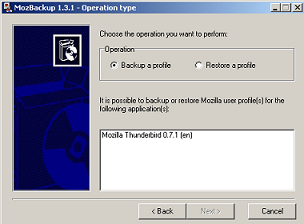
I use Mozilla Thunderbird for mail and Firefox
for my browser, I also reload my laptop on a
regular basis so I am always looking for handy
ways to back up my data and I have found on in
MozBackup. It allows you to back up your mail
and mail settings as well as your bookmarks and
browser settings. All in all a good product.

It looks as if the folks over at six apart are
revamping their license model. It looks like
they are taking the complaints of there customer
base to heart and making some changes that will
ease the wrath.
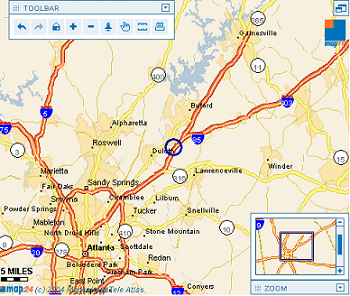
Map24 may be the best map site I have ever
used. The interface is clean and fast and
gives you just the info you want. So much
better than mapquest.

Looks like the folks over at
sixapart.com have released
movabletype 3.0.
Update: Just installed it and
it looks very nice.
Link

I have been using burnatonce for a few months
now and find it to be a nice addition to the
software I keep on my machine. It is small, clean,
and free. If you are looking for a command line
solution for Windows XP or Windows 2003 there
is a nice utility in the 2003 Resource Kit that will
allow you to burn iso images without the GUI.

As a general rule I have never run any anti-virus
software. I think they slow down your machine
and as long as you know what you are doing it's
damn hard to get a virus on you computer. That
said the vast majority of folks have a limited
understanding of the inner workings of their PC
and the software that runs it. Which leads me to
this lovely piece of software. I run it on my parents
computers and it works very well for them. It is
not a massive resource hog, nor will it install 1000
utilities that you are never likely to use. It is also
free for individual users - big plus in my book.
I would recommend this product to anyone. The
install file is 6.78MB so it is not a fit for tinyapps
but in this day and age 7 meg is not to bad for
what you get.
Link (to free download)
Alright it is time for everyone on the internet to take a moment and
protect themselves against the perils that lie in wait for the unsuspecting
websurfer. I have had a week of people asking me
"what is wrong with my computer?" and "why does this damn porn site
popup when my boss walks in?" . Well here is why, you clicked ok
or you did not read the popup info or you were at a site where bad things
happen to good people. What ever the reason here is what you should
do to protect yourself.
First download and install two pieces of free software.
- Adaware
-Spybot Search & Destroy
With these two apps you are a long way toward surfing safety. Once you
have them installed and have run them the next step is to go and install
the Google Toolbar. It has one of the best popup blockers around. I run it
on all my Windows machines. With all of this in place you just need not to
click ok on a popup use the "x" button in the upper right corner of the
window and close it or right click on the app running in the task bar and
choose the close option.
If you can surf with a little thought about what u are doing you can eliminate
about 90% of all spyware and other nasty code.

viWord is a macro that allows you to use vi commands
while in Word. What more could one man want????

NanoBlogger is a small weblog engine written
in Bash, that uses common unix tools, such
as cat, grep and sed. It's free to use and
modify under the GNU General Public License.

Shell script defined as:
"Shell Script is series of command written in
plain text file. Shell script is just like batch file
is MS-DOS but have more power than the MS-
DOS batch file."
I now have a spell checker for IE. I hope it will help
If you read my site on a regular basis you will know
that monkeys spell for me (blind one armed monkeys).
If you do happen to spot a misspelling or a grammar
mistake feel free to post it in the comments. It will
not hurt my feelings at all.

ReactOS is an Open Source effort to develop a quality
operating system that is compatible with Windows NT
applications and drivers.

Looks like the exchange developer team
now has a blog of there own. This could
be a good thing.

Owl is a multi user document
repository (knowledgebase)
system written in PHP4 for
publishing of files/documents
onto the web for a corporation,
small business, group of people,
or just for yourself.
Link
If you run Windows and you use
Unix you need this. SFU Ver3.5
is now a free download.

Just start typing in your zip code and watch it zero in.
Link (via BoingBoing)

ClarkConnect transforms standard
PC hardware into a dedicated broad
band gateway and easy-to-use server.
The award-winning Linux-based
solution includes firewall and security
tools, along with file, print, web, e-mail,
proxy, antivirus, antispam, content
filtering and VPN servers.

I have been using Firestarter for about a week now and I love it.
It is the first netfilter/iptables configuration interface I have come
across that is easy to use and very straight froward. It has a
well laid out Wizard for novice users and lots of configuration
options for the more advanced. If you run Linux give it a try.

The Fedora Project is a Red-Hat-sponsored and community
-supported open source project. It is also a proving ground
for new technology that may eventually make its way into
Red Hat products. It is not a supported product of Red Hat,
Inc.The goal of The Fedora Project is to work with the Linux
community to build a complete, general purpose operating
system exclusively from free software. Development will
be done in a public forum. The project will produce time
-based releases of Fedora Core about 2-3 times a year
with a public release schedule. The Red Hat engineering
team will continue to participate in the building of Fedora
Core and will invite and encourage more outside particip
-ation than was possible in Red Hat Linux. By using this
more open process, we hope to provide an operating
system that uses free software development practices and
is more appealing to the open source community.
Nice feature.
Link - Primate Brow Flash
Easy boot floppy creation. "cat bootdisk.img > /dev/fd0"
Did you ever want to trash a linux box fast well heres how.
"cat /var/log/messages > /dev/hda; reboot" This will over write the standard partition table.
"pstree" will show you a tree view of the order your services load.
So here is some of what they are pouring into my head.
Non-computer types should run...
So if your ever on a linux box and would like to know about the
hardware your on here are some ways.
under the /proc dir are many useful files.
cat /proc/cpuinfo - gives you all the info about your processor.
cat /proc/meminfo - tells you all about your memory and how it is used.
I'm sure that you will run and look in your proc dir so I will give you some more info
about what you are seeing there.
First thing you will notice with an ls is that there are many directory names that are only numbers
(1, 4, 10, 4839) and on and on well these are the processes that are running on your box.
When you run ps -ef it comes here to get the info and you can too. If you go into one of these dirs you can learn much.
try this cat /proc/(process number)/cmdline will tell what the command
line was that started this process.
Kinda handy no?
now for some network fun.
So you want to turn off ping response on heres how to do it real time
(later on I will show you how to make it permanent.)
as a side note remember that the proc file system is in memory.
echo 1 > /proc/sys/net/ipv4/icmp_echo_ignore_all (1 sets this variable on 0 sets it to off)
1 = no ping
2 = ping
A note of warning the proc file system is live and the changes you make are instant you
can bring your system to its knees without much effort playing here. The good side
is that all of the data in proc is in memory and a reboot will bring back the original data.

Intrusec's Exposé is a new class of network security
software, a network change detection system, that
provides continuous monitoring of your network for
the appearance of new systems and services, and
changes to existing ones. It installs on a single PC
and proactively monitors up to several thousand
devices on the network for changes to the state of
any of the devices on it or the network itself. Based
on active detection technology (it directly interacts
with your network instead of passively sniffing traffic),
Exposé can monitor systems across your entire network,
and is not limited to individual ethernet segments or by
physical network topology.
Link
This article over at The Inquirer explains how the take the bloated thing
that is now Acrobat 6 and cut it down to size.
"Install Adobe Reader 6 :)
From the Start->Run windows menu, Open the
"x:\Program Files\Adobe\Acrobat 6.0\Reader" folder,
where x is the right drive letter.
Find the plug_ins folder and rename it plug_ins_disabled
Create a new folder named plug_ins
Copy the following files from "plug_ins_disabled" to "plug_ins":
EWH32.api, printme.api, and search.api"
I just tried it and man what a difference Acrobat 6 loads in about 2 seconds.
Link
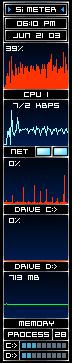
A small free configurable system meter.
Link

Oh yea it's all about the ASCII file manager. Oh to remember the days
of Norton Commander, XtreeGold, and PC Tools.
Link

This ones for Charles cause we know he loves it.
500 issues of Mad on 7 CD's.
Link
Rather than looking at raw data in packets and trying to understand what it
represents, Iris takes network traffic and returns it to its original format with
the simple click of a button. With Iris, you’ll be able to read the actual text of an
email — as well as any attachments — exactly as it was sent. Iris will
reconstruct the actual html pages that your users have visited and even
simulate cookies for entry into password-protected websites. Link